

What is Advanced Date Shopping Studio?
Keep the delivery promise without paying for more speed than you need.
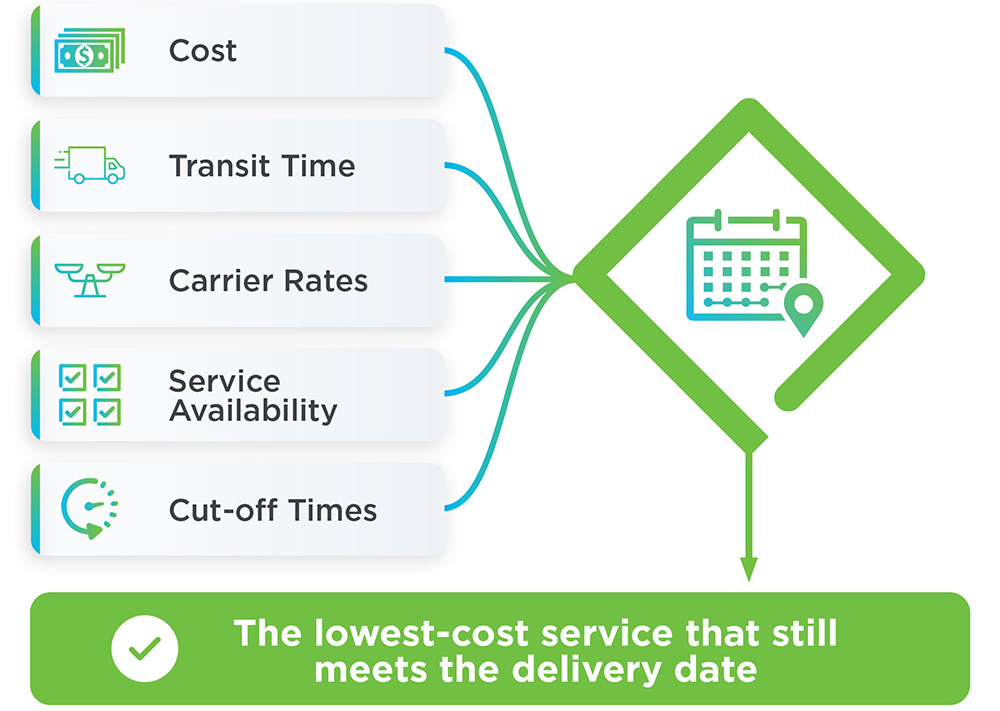
Advanced Date Shopping (ADS) Studio is ProShip's delivery-date aware rate shopping solution, built on Advanced Date Shopping (ADS). Instead of selecting the cheapest carrier option alone, it evaluates cost, transit times, carrier rates, service availability, and operational cut-off times to select the cheapest option that can actually meet the delivery promise.
It's the most advanced form of automated rate shopping ProShip offers, and it's proprietary, no other platform has it.
Why the Cheapest Rate Isn't Always the Right Service
Every carrier has its own pickup and transit schedules, and delivery commitments change by service level. Cut-off times vary by warehouse, service, and day. Picking the right service means accounting for all of it on every shipment, and the cheapest option on paper may not make the delivery date.
For logistics and ops teams, a wrong pick means either a missed delivery promise or paying for speed the order didn't need. For IT, rate shopping rules that live in code or scripts mean every change lands in the queue, and when a service choice looks wrong, nobody can easily see why.
Set the Rules and See Every Decision
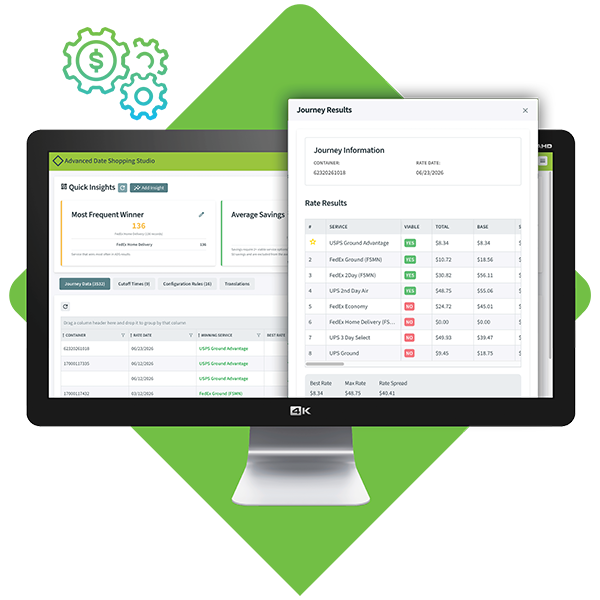
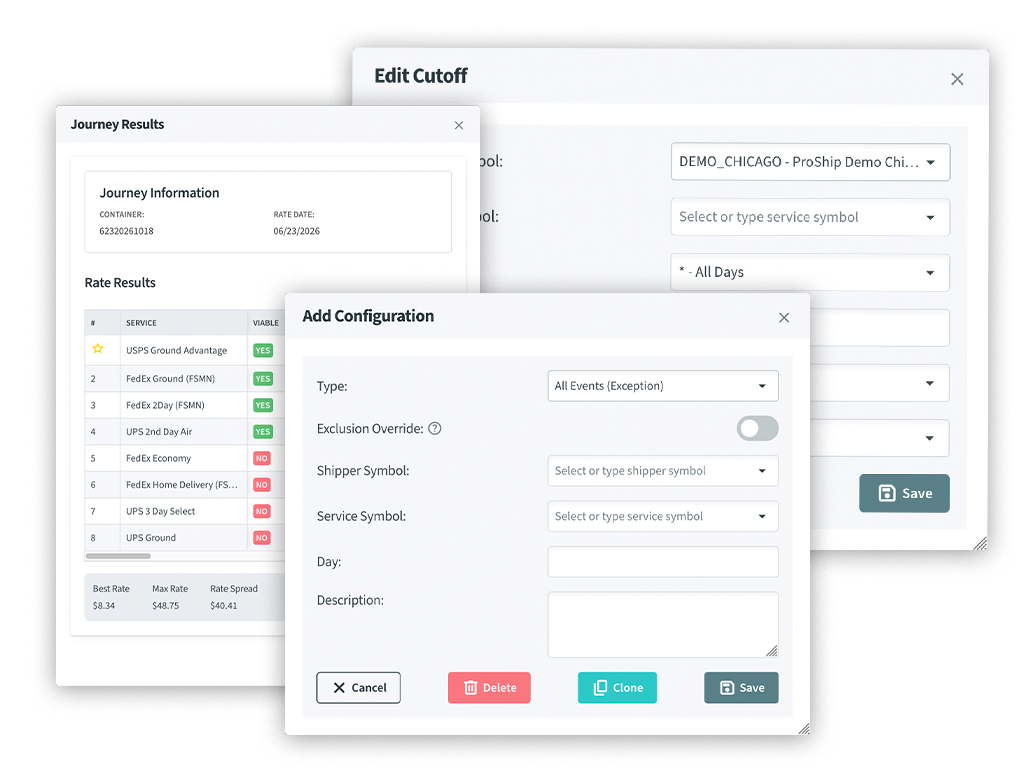
The Studio is where your team works with ADS. Operations teams set carrier rules and trailer cut-off times by shipper, service, and day, and the Journey Viewer shows how every shipment was evaluated and why the winner was picked. Day-to-day changes don't require SQL scripts or an engineering ticket.
The Benefits of ADS Studio
 On Time at the Lowest Cost
On every shipment, ADS Studio compares the services that can make the delivery date and picks the lowest cost one, so you keep the promise without paying for more speed than the order needs.
Control Over the VariablesSet carrier rules and trailer cut-off times by shipper, service, and day in the Studio, without SQL scripts or engineering tickets. Copy configurations between servers with CSV import and export instead of rebuilding them by hand.
Decision VisibilityThe Journey Viewer shows exactly how ADS evaluated every shipment, which services were considered or eliminated, and why the winner was selected. Quick Insights tracks the average savings against the next best rate. Teams can validate outcomes, diagnose misses, and defend savings with data instead of assumptions.
Key Features of ADS Studio

Delivery-Date Service Selection
Compares every service that can make the delivery date and picks the lowest-cost one, shipment by shipment.

Journey Viewer
Drill into individual shipments to see every service evaluated, why a given service won or was eliminated, rates, surcharges, commitment times, and pickup dates.

Quick Insights Dashboard
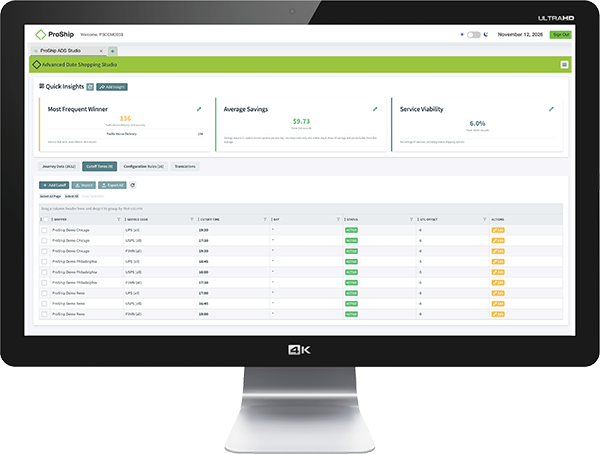
Configurable analytics tiles showing at-a-glance metrics like the most frequent winning carrier, the percentage of viable services, and average savings generated by ADS.

Configuration Rules Management
View, add, edit, and import or export ADS configuration rules in the Studio, no SQL scripting required.

Cut-Off Time Management
Define trailer cut-off times by shipper, service, and day, with support for wildcard and date-specific rules, factored directly into ADS transit calculations.

Service & Carrier Translation
Maps internal ProShip codes to human-readable carrier and service names via the ProShip API, with raw codes shown as a fallback when translation isn't available.

Diagnostic Screen
Confirms connectivity to the database, Config API, System API, and ProShip API at setup, so configuration issues show up before anything fails downstream.

Import/Export
Configuration rules and cut-off times can be exported to CSV and re-imported for backups, bulk edits, or migrations across server environments.

Centralized Authentication
Shares the same authentication service as CVB Studio and Unified, with SSO support via providers like Entra. No separate auth configuration per application.
How ADS Studio Works
A rate shop request is received and evaluated against configured cut-off times and configuration rules.
ADS Studio filters out services that can’t meet the required delivery date based on transit time and cut-off logic.
From the remaining viable services, ADS Studio selects the winning service based on rate and delivery commitment.
The full evaluation, including services considered, rates, surcharges, and why the winner was chosen, is logged and available in the Journey Viewer for shipment-level inspection.
Request Received
Cut-off / Rule Evaluation
Services That Miss the Date Removed
Lowest-Cost Service Selected & Logged
ADS Studio for Your Team

For Logistics/Ops Teams
You own the trade-off between shipping cost and on-time delivery. ADS Studio picks the lowest-cost service that meets the delivery date, lets you adjust cut-off times and rules as your sites change, and shows you why each service won. You spend less time fighting fires and more time trusting the numbers.

For IT Teams
ADS Studio keeps rate shopping configuration out of SQL scripts and in a UI your operations team can use directly. It uses the same sign-on as ProShip's other Studios, a diagnostic screen confirms database and API connectivity at setup, and configuration can be backed up or migrated with CSV import and export.
FAQ About ADS Studio
Is ADS Studio separate from Advanced Date Shopping?
No. ADS Studio combines ProShip's ADS engine with the Studio where your team configures it and reviews its decisions. They're delivered together.
Can we manage cut-off times for specific shippers, services, and days?
Yes. Cut-Off Time Management supports wildcard rules across all services or specific ones, and day-based rules covering all days, specific weekdays, or specific calendar dates.

How do we see why a particular service won or lost?
The Journey Viewer shows every service evaluated for a shipment, including rates, surcharges, commitment times, and the specific reason a service was selected or eliminated.
Does ADS Studio require a separate authentication setup?
No. It shares the same authentication service as CVB Studio and Unified, including SSO support via Entra.
What’s the difference between basic rate shopping and Advanced Date Shopping?
Basic rate shopping compares carrier rates to find the lowest cost option. Advanced Date Shopping goes further by validating which of those options can actually meet the required delivery date before cost is considered.
| Basic Rate Shopping | Advanced Date Shopping Studio |
|---|---|
| Compares carrier rates for the lowest cost | Compares rates against 9 data sets to validate which services can still meet the delivery date |
| Treats every viable-looking service as equal | Eliminates services that may seem the most cost effective but miss cut-off or transit requirements |
| Limited insight into why a service was chosen | Full journey-level visibility into evaluated services, rates, and outcomes |
| Configuration tied to engineering resources | Rules and cut-off times managed in the Studio by ops or IT |
Learn more about ProShip's Advanced Date Shopping
View the Advanced Date Shopping brochure to see how ProShip allows shippers to check every service against cut-off times and transit requirements before comparing cost, so the lowest-cost option they choose still meets the delivery date.
Ready to Pick the Right Service on Every Shipment?
Connect with a ProShip Parcel Shipping Expert to learn how.